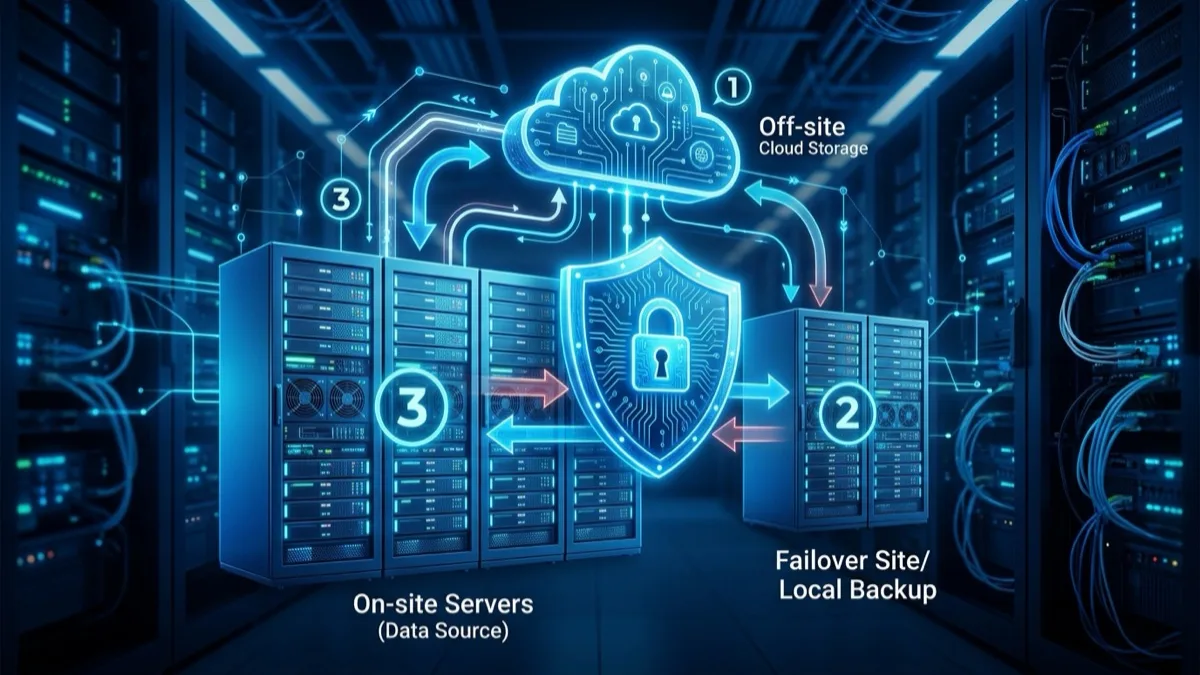
Managed backup and disaster recovery (BDR) for a Canadian SMB means automated backups stored in at least two locations — one of which is offline or immutable — combined with a tested recovery plan that restores operations within your defined RTO. For a 10–50 user business, the all-in cost typically runs CA$350–$1,500 per month depending on data volume, server count, and whether cloud failover is included. Without quarterly tested restores and at least one air-gapped copy, you do not have a real BDR program regardless of what software you are running.
Updated June 2026 · Vendor-neutral · Canadian regulatory context throughout
What are backup and disaster recovery services?
Backup and disaster recovery (BDR) covers two related but distinct disciplines. Backup is the process of creating copies of your data on a schedule and storing them in locations your primary systems cannot reach. Disaster recovery is the process of restoring operations after an event — ransomware, hardware failure, fire, flood, or human error — that makes your primary systems unavailable.
Many Canadian small businesses conflate the two or address only backup, then discover during an actual incident that having copies of data is not the same as being able to resume operations. A file-level backup of your accounting data does not help if the accounting software's SQL database is corrupted and you have never tested restoring it to a clean server. A cloud sync folder is not a backup if ransomware has already encrypted the local copies and synced the encrypted versions to the cloud.
A proper BDR service connects the two layers: it defines what data and systems must be recoverable, how quickly (RTO) and to what point in time (RPO), then builds and maintains the backup infrastructure, monitors job completion, tests restores on a schedule, and keeps a documented recovery procedure your team can actually execute under pressure at 2 AM.
For the purposes of this guide, "managed BDR" means a third party — either a managed service provider (MSP) or a cloud-native backup service — handles the monitoring, alerting, rotation, and quarterly testing on your behalf. You are not manually checking backup logs every morning or discovering failed jobs only when you need to restore.
The distinction matters because most Canadian SMBs that experience a catastrophic data loss event had something in place — they just had not verified it worked. A managed BDR service's primary value is not the software; it is the operational wrapper that ensures the software is actually doing its job.
Why Canadian SMBs need a DR strategy in 2026
The Canadian Centre for Cyber Security (cyber.gc.ca) reported a significant and sustained rise in ransomware incidents targeting small and medium businesses in 2024 and 2025. The average ransom payment demanded from Canadian SMBs crossed CA$200,000 — but the ransom itself is only a fraction of total incident cost. Emergency IT labour, hardware replacement, regulatory fines, reputational damage, and customer churn typically dwarf the ransom payment.
Consider what a 48-hour outage costs a typical Canadian SMB with 15 employees at an average of CA$55,000 per year:
- Lost staff productivity: roughly CA$3,960 (15 employees × CA$55k ÷ 250 working days × 2 days)
- Missed sales or billable hours: varies widely — CA$5,000 to CA$50,000+ depending on industry and revenue concentration
- Emergency IT response and incident management: CA$3,000–$15,000 for an experienced incident response firm
- Hardware replacement if physical damage involved: CA$2,000–$20,000
- Customer churn and reputational damage: hard to quantify in 48 hours but often the largest long-term cost
The 2024 CIRA Cybersecurity Survey found that 40% of Canadian organizations that experienced a cybersecurity incident suffered data loss, yet fewer than 30% had a documented and tested disaster recovery plan. That gap — between having some form of backup and having a tested, workable DR strategy — is where most Canadian SMBs are exposed.
Beyond the operational cost, Canadian law creates specific data-retention and data-protection obligations that make backup more than a best-practice recommendation. CRA requires that electronic business records — invoices, payroll records, GST/HST filings — be retained for six years and be accessible on request. PIPEDA (the federal Privacy Act) and Quebec's Law 25 (Bill 64) require organizations to protect personal information against loss and unauthorized access and to report breaches involving significant risk of harm. Losing client data because your only backup was attached to the same network ransomware encrypted is both an operational catastrophe and a potential regulatory violation with mandatory breach notification requirements.
Physical disasters are less common than cyber incidents for most Canadian SMBs, but they are not hypothetical. The 2024 ice storms across Ontario and Quebec knocked out power to thousands of businesses for 24–96 hours. The wildfires that have driven evacuations in Fort McMurray, Kelowna, and Yellowknife have physically destroyed or made inaccessible the entire local infrastructure of businesses with no offsite backup. A disaster recovery strategy that assumes your building will always be accessible is not a complete strategy.
The 3-2-1 backup rule: what it means for Canadian businesses
The 3-2-1 backup rule is the most widely cited backup best practice and remains the correct foundation for any SMB DR strategy in 2026. It predates the cloud era but maps cleanly onto modern infrastructure:
- 3 copies of your data total (production counts as one, plus two backups)
- On 2 different types of media or storage — for example, a local NAS appliance and a cloud object storage bucket
- With 1 copy offsite or offline — air-gapped physical media or immutable cloud storage that ransomware cannot modify
For most Canadian SMBs in 2026, a practical implementation looks like this: production data lives on workstations, servers, or Microsoft 365. An on-site backup appliance (NAS or dedicated BDR device) takes snapshots every one to four hours. Those snapshots are also replicated to a Canadian cloud data centre. A third copy is written to immutable (WORM) cloud storage or a physically disconnected encrypted drive rotated weekly and stored offsite.
The reason you need that third offline copy is ransomware. Modern ransomware variants specifically target attached network drives and mapped backup destinations before encrypting primary data. The attack sequence is often: land on one endpoint, spread laterally, locate and destroy every backup destination reachable via the network, then begin mass encryption. An offline copy — either a drive physically unplugged or a cloud bucket with immutability locks enabled — is the backstop ransomware cannot touch.
Some practitioners now advocate for a 3-2-1-1-0 extension: three copies, two media types, one offsite, one offline, zero restore errors verified by testing. The "zero errors" qualifier is the one most businesses skip — and the most important one. A backup with one undetected error is a backup you might not be able to restore. Our full 3-2-1 backup rule guide covers each component in more detail, including version retention periods that account for ransomware dwell time of two to four weeks before detection.
RTO and RPO: your recovery window in real numbers
Before selecting any backup technology or managed service, you need two numbers agreed upon by the business: your RTO and your RPO. These are not IT decisions — they are business decisions that IT then implements.
Recovery Time Objective (RTO) is the maximum amount of time your business can tolerate being offline before the impact becomes unacceptable. A veterinary clinic that cannot access patient records has an RTO of maybe two hours. A law firm in a non-urgent period might accept eight hours. A SaaS company serving enterprise customers may need sub-hour RTO. A restaurant on a Friday evening has a POS-dependent RTO of under 30 minutes.
Recovery Point Objective (RPO) is how far back in time you can afford to roll back your data. If your backups run once a day at midnight and you suffer a ransomware attack at 4:30 PM, you lose an entire day of transactions. If your RPO is four hours, your backup schedule must run at least every four hours — and probably more often, since the last backup job does not always complete cleanly before the next one starts.
For a typical Canadian SMB across most industries, realistic starting targets are:
- RTO: 4–8 hours — achievable with a local BDR appliance and a documented, practiced runbook
- RPO: 1–4 hours — achievable with incremental backups every one to four hours plus application-consistent snapshots for databases
Lower RTO — under two hours — requires cloud failover rather than simple backup and restore. Restoring a physical Windows Server from a backup image, even from a fast local appliance, typically takes four to twelve hours including OS rebuild, software installation verification, and database consistency checks. Cloud failover keeps a warm copy of your servers in the cloud that can be activated without hardware rebuild.
Work backwards from your RTO when selecting technology. If you need to be operational in four hours, and a restore takes three hours on a good day, you have one hour of margin before a single retry puts you over target. That math is why quarterly restore testing is not optional — it tells you whether your infrastructure can meet your RTO before an incident does. Document your RTO and RPO formally in a disaster recovery plan. Our disaster recovery plan template provides a starting structure compatible with PIPEDA and Law 25 documentation requirements.
Components of a managed backup and DR service
A complete managed BDR service for a Canadian SMB typically includes the following layers. Not every provider includes all of them at every price point — understanding exactly what is in scope versus what you remain responsible for is one of the most important questions to resolve before signing any contract.
- Endpoint and server backup: Workstations, laptops, and on-premises servers backed up on a defined schedule. Typically every one to four hours for production servers, once daily for endpoints. Includes application-consistent snapshots for databases (SQL Server, MySQL, QuickBooks) using VSS-aware backup methods.
- SaaS data backup: Microsoft 365 — Exchange, SharePoint, OneDrive, and Teams — is not fully protected by Microsoft itself. Microsoft's service agreement covers infrastructure uptime, not your data against accidental deletion, malicious deletion, or ransomware that attacks your M365 tenant via a compromised admin credential. A dedicated Microsoft 365 backup tool (Veeam for Microsoft 365, Acronis, Datto Backupify, or Cove Data Protection) is required. See our Microsoft 365 guide for a full comparison. The same applies to Google Workspace.
- Local BDR appliance: An on-site device — NAS, server, or dedicated BDR appliance from vendors like Datto, Acronis, or Veeam-compatible hardware — that stores short-term backup copies locally. Local restores are dramatically faster than cloud restores: a 200 GB server image typically restores from local in one to three hours versus six to fourteen hours from cloud, depending on your internet connection speed.
- Cloud replication: Encrypted copies of your backup data transmitted to a cloud data centre in Canada. Major options with confirmed Canadian data residency: AWS Canada (Central — Montreal), Azure Canada Central (Toronto) and Canada East (Quebec City), and Google Cloud Montreal. Some backup vendors — Datto, Acronis, Cove — operate their own Canadian cloud infrastructure separate from the hyperscalers.
- Immutable or air-gapped storage: At least one backup copy written to storage that cannot be modified or deleted until a defined retention period expires — whether that is S3 Object Lock with WORM compliance, Azure Immutable Blob Storage, or a physically disconnected encrypted drive stored offsite. This is the ransomware backstop. Without it, a sophisticated ransomware attack can encrypt or delete every backup alongside your live data.
- Cloud failover (DRaaS): An optional but increasingly standard layer for businesses with sub-four-hour RTO requirements. Your on-premises servers are replicated as live virtual machines to a cloud data centre. In a declared disaster, those VMs can be started and staff can connect remotely within minutes to hours — no waiting for physical hardware delivery or OS rebuild.
- 24/7 monitoring and alerting: Continuous monitoring of backup job success, failure, and storage health, with immediate escalation when a job fails silently. Without active monitoring, a single misconfigured backup job can go unnoticed for weeks while you believe your backups are healthy.
- Documented recovery runbook: A written, step-by-step recovery procedure specific to your environment that a competent technician who has never seen your setup before could follow on your worst day. Includes credential locations (ideally stored in a password manager accessible independent of your infrastructure), the exact restore sequence for each protected system, and vendor support contacts.
- Quarterly restore testing with documentation: Scheduled tests that verify backups are complete, uncorrupted, and restorable within your RTO target. Monitoring tells you a backup job completed; testing tells you the result is actually usable. Test documentation is also increasingly required by Canadian cybersecurity insurers as a policy condition.
Ransomware-proof offline backups: the air-gap strategy
Ransomware is now the primary driver behind Canadian SMB investment in backup and DR. The Canadian Centre for Cyber Security's 2025 National Cyber Threat Assessment notes that ransomware operators increasingly target small businesses precisely because defences are lighter and payment decisions happen faster. The economics work against small businesses: a ransomware group demands less from an SMB than from an enterprise but still collects more than the SMB's total annual IT budget.
The attack pattern that defeats conventional backups is well established. Ransomware enters via a phishing email or an exploited internet-facing service. It spreads laterally across the network using stolen credentials or vulnerability exploitation. It locates backup destinations — mapped drives, NAS shares reachable from the infected host, cloud sync folders — and either encrypts them or deletes the backup catalog before beginning mass encryption of primary data. The entire sequence, from initial access to full encryption, can complete in under four hours on a flat network with no segmentation.
An air-gapped backup is one that ransomware physically cannot reach because it is not connected to the network at the time of the attack. There are two practical implementations for a Canadian SMB:
- Rotating encrypted external drives: Write a full or incremental backup to an encrypted external drive, disconnect it immediately after the job completes, and store it offsite — in a fireproof safe at a partner office, a bank safety deposit box, or a home office. Rotate two drives weekly, so the off-site copy is never more than one week old. This approach works for businesses with under 1–2 TB of data and requires operational discipline to maintain the rotation schedule. Cost: near zero beyond the drives themselves.
- Immutable cloud storage with WORM policy: Configure your cloud backup destination with an Object Lock policy — AWS S3 Object Lock, Azure Immutable Blob Storage, or an equivalent WORM-capable service. Once a backup object is written, it cannot be modified, overwritten, or deleted until the retention period expires — not by an administrator, not by a compromised backup service account, and not by ransomware acting with those credentials. This is the preferred approach for Canadian businesses with larger data volumes, remote teams, or multiple sites. Retention periods of 30 to 90 days are typical, giving you a recovery window longer than the average ransomware dwell time before detection.
It is worth being explicit about what does not qualify as an air-gapped backup: a NAS on the same LAN segment as your production systems; a cloud storage folder that is also synced to a desktop client; a USB drive left plugged in; or a backup job that writes to a share accessed via a service account that also has access to production systems. Each of these is reachable by ransomware with network-level or credential-level access. The air-gap or immutability must be real, not approximate.
One nuance: immutable cloud storage is secure against ransomware but not against account compromise where an attacker has access to the cloud console with sufficient IAM permissions to disable the lock. Use a dedicated IAM account with minimum necessary permissions for your backup service, and enable MFA on that cloud account.
Cloud failover for Canadian businesses: when to invest
Cloud failover — also called Disaster Recovery as a Service (DRaaS) — is the highest protection tier. Instead of simply copying backup data to the cloud, you continuously replicate your server environments as live virtual machines to a cloud data centre. When a declared disaster occurs, those VMs are activated and staff connect to them remotely, resuming work within minutes to a few hours rather than waiting for hardware arrival, OS reinstallation, and application reconfiguration.
The meaningful question for a Canadian SMB is whether the added cost of DRaaS is justified by the operational risk of a longer outage. The answer depends on four factors:
- RTO target: If your business can tolerate being offline for six to twelve hours, a local BDR appliance plus cloud backup covers you adequately. If you need to be operational within two hours, DRaaS is the only practical way to meet that target consistently.
- Critical line-of-business applications on physical servers: Accounting systems (Sage 300, QuickBooks Enterprise), ERP (Epicor, Syspro, SAP Business One), medical EMR (OSCAR, Telus PS Suite, PS/Suite), legal practice management (Clio on-prem, PCLaw), or POS infrastructure that cannot simply be reinstalled from a laptop in two hours. If those applications live on physical servers, DRaaS is worth evaluating.
- Physical site risk: Businesses in flood plains, high-fire-risk zones, or buildings with aging electrical infrastructure face a higher probability of site-level disasters where the physical office becomes inaccessible or destroyed. Cloud failover means the business continues regardless of the building's status.
- Remote workforce: If your staff already works remotely or has the ability to do so, activating a cloud failover environment is operationally straightforward. If everyone must be on-site to function, cloud failover is less valuable.
The most commonly deployed DRaaS platforms in the Canadian SMB market in 2026 are Veeam Cloud Connect (hosted by Canadian MSPs with Canadian data centres), Zerto (for VMware and Hyper-V environments), Datto BCDR (purpose-built for SMBs), and Azure Site Recovery (best for businesses already in the Azure ecosystem). AWS Elastic Disaster Recovery is also viable. All support Canadian data residency.
A typical DRaaS setup for a three-server SMB environment — one file server, one application server, one domain controller — in Canada runs CA$900–$2,200 per month including compute, storage, replication licensing, and managed services. Compare that cost to two scenarios: (a) sourcing replacement physical servers after a catastrophic site failure, which takes three to ten business days and costs CA$15,000–$40,000 in hardware alone, or (b) being offline for a week at the revenue and productivity cost calculated in the "Why Canadian SMBs need DR" section above. For most Canadian businesses with on-premises line-of-business applications, the math favours DRaaS over the implicit insurance of doing nothing.
Managed backup and DR pricing in Canada (CA$, 2026)
Pricing varies significantly based on data volume, number of protected servers and endpoints, backup frequency, cloud region, retention periods, and whether monitoring, testing, and runbook maintenance are included. The table below reflects typical all-in monthly costs for Canadian SMBs when engaging a managed service provider that bundles both the technology licensing and the operational management.
| Tier | What's included | Monthly cost (CA$) | Best for |
|---|---|---|---|
| Cloud backup only | Daily cloud backup to Canadian data centre, 30-day retention, basic monitoring, automated alerts on failure | CA$100–$250 | 1–5 users, cloud-first environment, no on-premises servers, low data volume |
| Hybrid BDR | Local BDR appliance + cloud replication, hourly snapshots, 90-day retention, 24/7 monitoring with alerts, SaaS backup (M365 or Google Workspace) | CA$350–$700 | 5–25 users, 1–3 on-premises servers, RTO target 4–8 hours, RPO 1–4 hours |
| Managed BDR + testing | All of Hybrid BDR plus immutable cloud copy (WORM), quarterly restore tests with documentation, written recovery runbook, compliance reporting for PIPEDA/Law 25/CRA | CA$600–$1,200 | 10–50 users, compliance obligations, Law 25 / PIPEDA scope, RTO ≤ 4 hours, cybersecurity insurance requirements |
| Full DRaaS (cloud failover) | All of Managed BDR plus live cloud failover VMs, sub-2-hour RTO target, annual failover test, remote staff access via cloud environment in disaster | CA$1,000–$2,500 | Businesses with sub-4-hour RTO requirements, on-premises line-of-business apps, physical site risk (flood/fire zones), critical revenue impact per hour of downtime |
These figures assume a typical Canadian SMB with 500 GB to 5 TB of total protected data across one to four servers. Larger datasets, higher server counts, or specialized applications — SQL Server with large databases, VMware clusters, EMR systems — push pricing higher. Microsoft 365 backup typically adds CA$3–$6 per user per month on top of the server-focused tiers above.
One-time implementation fees for a new BDR setup run CA$500–$2,500 depending on complexity, and cover initial configuration, baseline backup run, runbook creation, and the first restore test. Some MSPs roll implementation into a 12-month contract; others charge separately.
Add-on costs to account for: additional cloud storage beyond the base allocation (typically CA$0.02–$0.05/GB/month for Canadian regions); encryption key management services (CA$50–$200/month for enterprise key management); and cybersecurity insurance documentation packages (CA$200–$500/year, sometimes included in Tier 3 and 4 services).
How a managed BDR implementation works: step by step
If you engage an MSP to design and deploy a managed backup and DR program, here is what the process typically looks like over four to six weeks. Knowing these steps helps you evaluate proposals and ask the right questions before committing.
- Environment discovery and inventory (Week 1): The MSP inventories your complete environment — physical servers, virtual machines, workstations, laptops, SaaS applications, database applications, current data volumes, and any existing backup systems. They identify compliance requirements applicable to your business: PIPEDA scope, Quebec Law 25 if you operate in Quebec, CRA retention obligations, and any sector-specific requirements (healthcare, legal, financial services). This is also when they document which applications are "tier 1 critical" (must restore first) versus secondary.
- RTO and RPO definition (Week 1): Working with business stakeholders — not just IT — the MSP documents the maximum acceptable downtime and data loss for each system tier. Critical financial systems may have a 4-hour RTO and 1-hour RPO. A secondary file archive might have a 24-hour RTO and 24-hour RPO. These become the binding targets that the backup architecture must meet.
- Technology selection and architecture design (Week 1–2): Based on your environment, budget, and RTO/RPO targets, the MSP selects backup software and cloud destination. For Canadian data residency, they confirm the cloud region is within Canada. They also specify whether an on-site appliance is needed, which immutable storage configuration is appropriate, and whether DRaaS is in scope.
- Infrastructure procurement and deployment (Week 2–3): If an on-site BDR appliance is required, it is procured and physically installed. Backup agents are deployed on all protected systems. Schedules, retention policies, encryption keys, and cloud replication targets are configured. Immutable storage buckets or WORM policies are enabled at the cloud level with a designated retention window.
- Initial baseline backup (Week 3): The first full backup run captures the complete dataset. Depending on data volume and available network bandwidth, this seed backup can take 24 to 72 hours. For large initial datasets, some MSPs perform local seeding (writing the initial backup to a drive that is shipped to the cloud provider) to avoid weeks of slow initial replication over the internet.
- Recovery runbook creation (Week 4): The MSP documents the exact restore procedure for each protected system — not a generic "restore from backup" note, but a numbered checklist specifying which credentials to use and where they are stored, the sequence in which systems must be restored for application dependencies (domain controller before file server, for instance), post-restore verification steps for each application, and vendor support contacts with account numbers. The runbook is stored in a password manager and in printed form offsite.
- First restore test (Week 5): A full restore test is performed in an isolated environment — not on production hardware. The MSP times the restore against the defined RTO, verifies data integrity and application functionality at the RPO checkpoint, and documents the result. Any gaps found during the test trigger runbook and configuration updates before handoff.
- Monitoring setup and ongoing management (Week 6 and ongoing): 24/7 monitoring is configured for backup job status, storage utilization, and replication lag. Monthly summary reports are generated. Quarterly restore tests are scheduled in advance. The MSP reviews and updates the runbook whenever there is a significant infrastructure change — new server, new application, staff change, cloud migration.
Backup testing cadence: how often to verify restores
A backup you have not restored is a hypothesis. The most common version of the Canadian SMB backup disaster story is not "we had no backups" — it is "we had backups but discovered on the day we needed them that they were incomplete, corrupted, or required a restore process no one had ever run before." That discovery, at 3 AM on a Tuesday after a ransomware attack, is avoidable with a defined testing cadence.
The Canadian Centre for Cyber Security's IT security guidance and widely adopted frameworks including NIST 800-53 and CIS Controls all specify restore testing on a defined schedule. Here is a practical cadence for Canadian SMBs at each scale:
- Daily (automated): Automated verification that each backup job completed without errors and that the backup file passes integrity checks — typically a hash or checksum verification built into enterprise backup software. The MSP's monitoring dashboard should show a clean status for every job each morning. Any failure triggers an immediate alert and same-day remediation.
- Monthly (manual spot test): A technician manually restores a single critical system or database to an isolated test environment — not the production server. Verify the application starts cleanly, data is consistent to within the expected RPO window, and the restore time is within the RTO target. Document the start time, restore size, elapsed time, and any issues encountered.
- Quarterly (full restore test): A complete restore test of your primary server or most critical application stack. Time the end-to-end recovery against your RTO. Test both local restore (from the on-site appliance) and cloud restore (from the cloud copy) to verify both paths work. Review the runbook for accuracy and update any steps that have changed since the last test. This is the minimum frequency recommended by cyber.gc.ca and by most Canadian cybersecurity insurance underwriters — an increasing number of SMB cyber policies now require evidence of at least quarterly tested restores as a condition of coverage.
- Annual (full DRaaS failover test): For businesses with cloud failover configured, activate the full failover environment once per year. Have staff attempt to perform real work in the cloud environment for two to four hours. Document gaps in functionality, access, or performance versus the production environment. Optimize the failover configuration based on the test. Some Canadian cybersecurity insurers require annual DRaaS test documentation as part of their renewal questionnaire.
Testing should always be documented — not to satisfy bureaucracy, but because documentation is the only way to trend restore performance over time and catch degradation before it becomes a real incident. If your restore test consistently runs in three hours and then one quarter runs in seven hours, you know something changed and you have time to investigate before you need that backup to work under pressure.
DIY backup vs managed BDR: an honest comparison
Many Canadian SMBs start with a DIY approach — a Windows Server Backup job writing to a NAS, a cloud sync tool like Backblaze Business, or a manual external drive rotation. This is better than nothing, but there are concrete gaps versus a managed BDR service. The table below compares both approaches across factors that matter when an actual incident occurs.
| Factor | DIY backup | Managed BDR service |
|---|---|---|
| Setup cost | Low — CA$0–$500 for software and drives | CA$500–$2,500 one-time implementation |
| Ongoing monthly cost | CA$50–$200 (cloud storage fees) | CA$350–$2,500 (all-in, technology + management) |
| Silent failure risk | High — backup jobs fail for weeks without anyone noticing | Low — 24/7 automated monitoring with immediate alerts on any failure |
| Ransomware protection | Weak if backup destination is network-attached; vulnerable to simultaneous encryption with production data | Strong — immutable cloud storage and air-gapped copies are standard components, not afterthoughts |
| Database backup quality | Often file-level only; SQL databases and QuickBooks company files backed up mid-write may be corrupt | Application-consistent snapshots using VSS or database agents — restores to a transactionally consistent state |
| Restore testing | Rarely done — no scheduled cadence, no documentation, typically happens for the first time during a real incident | Monthly spot-tests and quarterly full restore tests, documented with timing and results |
| Recovery runbook | Usually absent or years out of date; recovery depends on institutional knowledge of whoever set it up | Maintained, tested quarterly, and accessible independent of company infrastructure |
| Microsoft 365 coverage | Typically not covered — Exchange and SharePoint data is unprotected against accidental deletion or M365 tenant ransomware | Included as a standard component in Tier 2 and above managed BDR services |
| Compliance and audit readiness | Minimal documentation; hard to demonstrate PIPEDA / Law 25 / CRA due diligence if asked | Monthly reports, test logs, runbook, and retention records — ready for regulatory review or insurance audit |
The hidden cost of DIY backup is incident response time. When a ransomware attack or hardware failure occurs, the business owner or a generalist IT contact is piecing together a recovery process in real time, discovering for the first time whether the backup software installed three years ago is still licensed, whether the restore target has enough disk space, and whether the database backup produces a clean restore or a corrupt one. A managed BDR service's value is the documented process and the tested infrastructure — the certainty that someone has verified the answer before you are in crisis and need to act fast.
Canadian regulations that shape your backup strategy
Three regulatory frameworks directly affect how Canadian SMBs must approach backup and data retention. Getting this wrong is not just a best-practice gap — it can result in regulatory enforcement action, mandatory breach notifications, and director liability.
PIPEDA (Personal Information Protection and Electronic Documents Act): Canada's federal private-sector privacy law requires organizations to protect personal information using "security safeguards appropriate to the sensitivity of the information." This includes protection against unauthorized access, collection, use, disclosure, copying, modification, or disposal — and explicitly includes protection against loss. The PIPEDA breach reporting rules (in force since November 2018) require organizations to report to the Office of the Privacy Commissioner of Canada (priv.gc.ca) any breach of security safeguards involving personal information that creates a "real risk of significant harm" to individuals, and to directly notify affected individuals. A ransomware attack that destroys client personal data, or that exposes it to the ransomware operator, is typically a reportable breach. Inadequate backup safeguards — specifically failing to maintain an offline or immutable copy — could be characterized as a failure to implement appropriate security safeguards.
Quebec Law 25 (An Act to modernize legislative provisions as regards the protection of personal information — Bill 64): Quebec's Law 25 strengthens privacy obligations for businesses that collect, use, or communicate personal information about Quebec residents. Fully in force as of September 2023, Law 25 requires a designated privacy officer for any business regardless of size, mandatory privacy impact assessments (PIAs) for high-risk projects, and 72-hour breach notification to the Commission d'accès à l'information (CAI) for incidents involving personal information. Critically for backup strategy: Law 25 requires that when personal data is communicated outside Quebec, the organization conduct a PIA to confirm the receiving jurisdiction provides adequate protection equivalent to Quebec law. This applies to cloud backup destinations outside Quebec — including Canadian federal jurisdiction provinces, which are not automatically considered equivalent. If your backup destination is an Ontario-based data centre or a US-based provider, a Law 25 PIA may be required.
CRA electronic records requirements: The Canada Revenue Agency requires businesses to retain records that support tax filings — including invoices, receipts, payroll records, and GST/HST documentation — for a minimum of six years from the end of the tax year they relate to. "Adequate" means the records must be complete, accurate, and retrievable on request. A point-in-time backup that you cannot search or from which you cannot extract specific date-range records without a full restore is not adequate. Your backup solution needs granular restore capability — the ability to retrieve a specific invoice from a specific date without restoring 500 GB of data — or you need to supplement backup with a compliant records management system. CRA can and does request electronic records during audits; the ability to produce them quickly is not optional.
For regulated industries, additional sector-specific requirements layer on top: provincial health privacy legislation (Ontario PHIPA, Quebec LMR) for healthcare providers; Law Society record-keeping requirements for legal practices; OSFI B-10 guidelines for financial institutions and their technology suppliers. Consult with legal counsel and your sector's regulatory body for sector-specific requirements rather than relying on IT vendor guidance alone.
Common backup and DR mistakes Canadian SMBs make
The same failure patterns appear repeatedly in backup assessments across Canadian businesses of all sizes. If any of these apply to your current setup, they are worth addressing before an incident forces you to find out the hard way.
- Treating cloud sync as backup. OneDrive, Dropbox, and Google Drive synchronization is not backup. When ransomware encrypts your local files, those encrypted versions are synced to the cloud in real time, overwriting the good copies. Version history helps but has retention limits (30 days in most free tiers) that may be shorter than the ransomware dwell time before detection. Only a dedicated versioned backup with immutable retention of 30 to 90 days provides adequate protection.
- Backing up only the file server and ignoring databases. A QuickBooks company file (.QBW) or a SQL Server database backed up at the file level while the application is running may be inconsistent or locked. Application-consistent backup using VSS snapshots or database agent integration is required for databases to restore to a transactionally clean state. Test this specifically — do not assume a file-level backup of a database file is restorable.
- No Microsoft 365 backup. Thousands of Canadian businesses discovered in 2024 and 2025 that Microsoft does not back up their Exchange mailboxes or SharePoint content against accidental mass deletion or ransomware attacking the M365 tenant via a compromised admin credential. Microsoft's service level agreements cover uptime, not your data. A third-party M365 backup tool is not optional for compliance-conscious businesses.
- Storing the recovery runbook exclusively inside the systems being recovered. If your runbook lives on the server that just encrypted, or in a SharePoint site hosted in the M365 tenant that is compromised, you cannot access it when you need it most. Store the runbook in printed form in a fireproof safe, in a personal email account independent of company infrastructure, and in a password manager with offline access capability.
- Using the owner's personal credentials for the cloud backup storage account. When the owner changes their password, enables MFA on their personal account without updating the backup service account, or leaves the business, backup jobs start failing silently. Use a dedicated service account with minimum necessary permissions for backup operations. Document those credentials in a shared password manager with at least two administrators.
- Encrypting backups but storing the decryption key in the backup system. Encrypted backups are meaningless without the key, and the key should never live exclusively in the environment that could be compromised. Store backup encryption keys in a password manager and in a hardware security module or offline media held separately from the backup system.
- Not accounting for backup data growth. A backup solution sized for 500 GB of data in 2024 may be running out of space by mid-2026 as data volumes grow. Backup storage approaching capacity causes job failures that may not trigger obvious alerts. Monitor storage utilization as part of monthly backup health reviews and plan capacity proactively.
- Assuming a backup job alert means the backup is good. A backup job can complete and send a success notification while producing a corrupt or incomplete backup image — particularly with databases under heavy write load, large virtual machine snapshots, or backup software bugs. The alert tells you the job ran. Only a test restore tells you the result is usable.
Case study: Hamilton manufacturing firm recovers from ransomware (anonymized)
A 22-person custom parts manufacturer in Hamilton, Ontario — call them Precision Parts Co. — ran two on-premises Windows Server machines: a file server holding 1.8 TB of CAD drawings, purchase orders, and supplier contracts; and an accounting server running Sage 50 connected to a SQL database. Their backup setup was a Windows Server Backup job writing nightly to a 4 TB NAS on the same LAN segment, with no offsite or cloud component and no documented recovery procedure.
In March 2025, ransomware entered via a phishing email opened on a salesperson's workstation at approximately 6:30 PM on a Thursday. By midnight, the malware had spread laterally using stolen domain credentials, located and mapped the NAS as a network share, encrypted both servers and the NAS backup storage, and delivered a ransom note demanding CA$95,000 in Bitcoin. Because the NAS was network-accessible, it was encrypted alongside the production data — the backup was destroyed before the production systems were locked.
The business owner discovered the attack at 7:15 AM Friday. Over the next four days they engaged an incident response firm (CA$14,000), confirmed no recoverable recent backups existed, located a USB drive with a six-month-old partial backup that was missing all CAD files created since September 2024, and ultimately paid the ransom after negotiating it down to CA$62,000 over two days. The threat actor provided a working decryptor for the servers but not for the NAS, meaning approximately 30% of the CAD archive remained unrecoverable.
Total incident cost: ransom CA$62,000, incident response CA$14,000, business interruption over four business days approximately CA$38,000 (lost production time, emergency overtime to rebuild customer CAD files from email attachments where available), and an engineering contractor at CA$8,500 to reconstruct three months of drawings from PDFs. Grand total: approximately CA$122,500.
Post-incident, Precision Parts Co. implemented a managed BDR service at CA$720 per month. Their current setup: hourly snapshots to a local Datto BDR appliance, automated replication to AWS Canada (Central) S3 with 90-day Object Lock immutability, monthly spot-test restores of the Sage 50 SQL database, and quarterly full restore tests documented with timing. Their new RTO target is six hours; RPO is one hour. Their annual managed BDR cost is CA$8,640 — approximately 7% of their ransomware incident total.
The lesson is not uniquely about this company. Their previous setup — nightly backup, network-attached NAS — was better than many Canadian SMBs. The vulnerability was specifically that the NAS was reachable from the infected network, and that a backup never tested for restorability turned out not to restore usable data even if it had survived. Both problems are solvable with standard managed BDR practices.
Backup and DR readiness checklist for Canadian SMBs
Use this checklist to assess your current backup and DR posture before an incident reveals the gaps. Each unchecked item is a specific, addressable risk. Print it, work through it with whoever manages your IT, and use it as the basis for a conversation with an MSP if multiple boxes remain unchecked.
- ☐ We maintain at least three copies of all critical data (3-2-1 rule compliance)
- ☐ At least one backup copy is offline or stored in immutable (WORM) cloud storage that ransomware cannot encrypt or delete
- ☐ Backup jobs run at least every four hours for production servers — aligning with our defined RPO
- ☐ All backup storage is located in a Canadian data centre, or we have completed a Privacy Impact Assessment for cross-border data transfers as required by Law 25
- ☐ Microsoft 365 (Exchange, SharePoint, OneDrive, Teams) or Google Workspace data is protected by a dedicated third-party backup tool, not relying solely on Microsoft or Google retention
- ☐ Databases (SQL Server, MySQL, QuickBooks) are backed up using application-consistent methods (VSS snapshots or database agents), not file-level copy only
- ☐ Backup jobs are monitored 24/7 with automated alerts on any failure — not reviewed manually each morning
- ☐ We have performed a successful full restore test within the last 90 days, timed against our RTO target, with documented results
- ☐ We have a written recovery runbook that a technician unfamiliar with our environment could follow without asking anyone questions
- ☐ The recovery runbook is stored somewhere accessible even if all company systems are offline and the building is inaccessible
- ☐ Backup storage uses a dedicated service account with minimum necessary permissions — not the owner's personal account or a domain admin account used for daily work
- ☐ Backup encryption keys are stored separately from the backup system, in a password manager with offline access and at least two authorized administrators
- ☐ CRA-required records (six-year minimum) are within scope of our backup and can be retrieved on demand without a full system restore
- ☐ Our cybersecurity insurance policy covers ransomware and business interruption, and we have shared backup test documentation with our insurer as evidence of our controls
If you have fewer than ten of these items checked, your business is carrying measurable and specific DR risk. The business continuity plan template can help you build the documentation layer. The lead form below connects you with a managed BDR assessment.
Frequently asked questions
What does backup and disaster recovery actually include?
A complete BDR solution includes automated daily (or more frequent) backups stored in at least two separate locations, an air-gapped or immutable offline copy that ransomware cannot reach, defined RTO and RPO targets, a written recovery plan, and quarterly tested restores to confirm the data is usable. Monitoring for job failures and SaaS backup (for Microsoft 365 or Google Workspace) are also standard components of a properly managed BDR service.
What is RTO and RPO in plain language?
RTO (Recovery Time Objective) is the maximum time your business can be offline before the impact becomes unacceptable — for most Canadian SMBs that is 4–8 hours. RPO (Recovery Point Objective) is how much data you can afford to lose, measured in time — typically 1–24 hours of transactions. Your backup schedule must run more frequently than your RPO, and your restore speed must meet your RTO. Both need to be verified by a real test, not assumed.
How much does managed backup and DR cost in Canada?
Managed backup and DR for a 10–25 user Canadian SMB typically runs CA$350–$900 per month depending on data volume, number of servers, cloud storage region and whether failover is included. Basic cloud-only backup starts around CA$150/month; full managed BDR with local appliance, cloud replication and quarterly testing is CA$600–$1,200/month; full DRaaS with cloud failover runs CA$1,000–$2,500/month.
Does Canadian law require businesses to back up their data?
PIPEDA and Quebec Law 25 require businesses to protect personal information against loss and unauthorized access, which implicitly requires robust backup and access controls. CRA also mandates that electronic business records be retained and recoverable for six years. Loss of personal data without adequate safeguards is a reportable breach under PIPEDA — failure to have an offline backup copy that ransomware could destroy may constitute a failure to implement appropriate safeguards.
What is an offline or air-gapped backup and why does it matter for ransomware?
An offline backup is physically or logically disconnected from your live network, so ransomware cannot encrypt or delete it. Cloud backups with immutable (WORM) Object Lock storage achieve the same result without requiring manual drive rotation. Without at least one offline or immutable copy, ransomware that spreads across your network can destroy every backup destination reachable via network shares alongside your production data, leaving no recovery option except paying the ransom or accepting total data loss.
How often should backups be tested?
The Canadian Centre for Cyber Security (cyber.gc.ca) recommends a full restore test at least quarterly. Critical databases and servers should be spot-tested monthly. The only backup that counts is one you have actually restored successfully — monitoring alerts confirming a job completed are not a substitute for verified restores. Many Canadian cybersecurity insurers now require evidence of quarterly restore testing as a condition of policy issuance or renewal.
Should Canadian businesses store backup data in Canada?
Quebec Law 25 (Bill 64) and PIPEDA require organizations to assess risks when personal data is communicated outside their jurisdiction and to notify individuals appropriately. Healthcare, legal, and financial sector businesses typically face additional requirements to keep data within Canadian borders. AWS Canada (Central), Azure Canada Central and East, and Google Cloud Montreal all provide Canadian data-residency options for backup and DR workloads.
What is cloud failover and when do Canadian SMBs need it?
Cloud failover replicates your servers as live virtual machines to a cloud data centre so that if your physical office is destroyed or inaccessible, staff can resume working from the cloud environment within hours rather than waiting for hardware. Canadian SMBs with on-premises servers running line-of-business applications — accounting, ERP, POS, EMR — and an RTO target under four hours benefit most from cloud failover. Businesses in high-risk physical locations (flood zones, wildfire zones) should also evaluate it regardless of RTO target.
Get a free backup and DR assessment
Tell us about your environment — servers, data volume, compliance requirements, and current backup setup — and we will map out a BDR strategy with realistic CA$ pricing for your specific situation. No obligation, no sales pressure, reply within one business day.